Audio designs
Upload audio only (a podcast, an interview, a voice note) and the editor builds the picture for you. Pick one of ten editorial designs, add your show name, episode and speaker, and choose whether the design sets the transcript itself or your caption preset does. The preview in the editor is the exact frame you export, and the API renders the same thing.
The ten designs
Default: editorial-cover. Sample images use a neutral illustration as the cover; your own artwork replaces it.
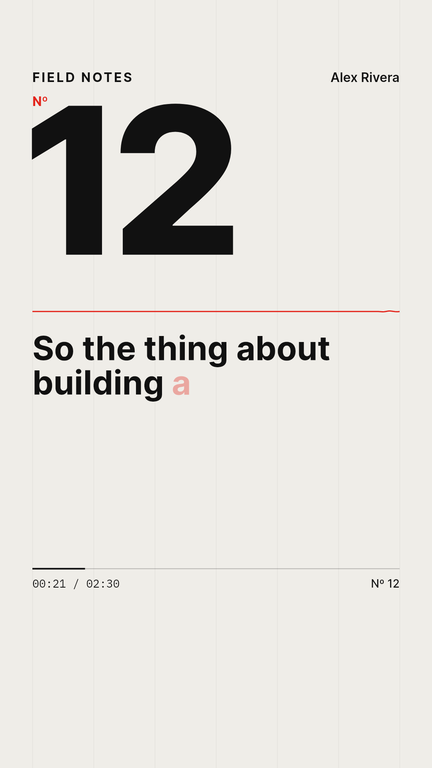
Swiss grid
swiss-grid · light
International-style poster: a huge episode numeral on a six-column grid, one red hairline tracing the last 1.6 s of voice, progress rule and timecode.
- Uses:
- Show name, Episode, Speaker
- When fields are empty:
- No episode: the numeral becomes the running timecode. No show/speaker: those labels are omitted.
- Presets that suit it (preset mode):
- Editorial, Sharp Notes, Frosted
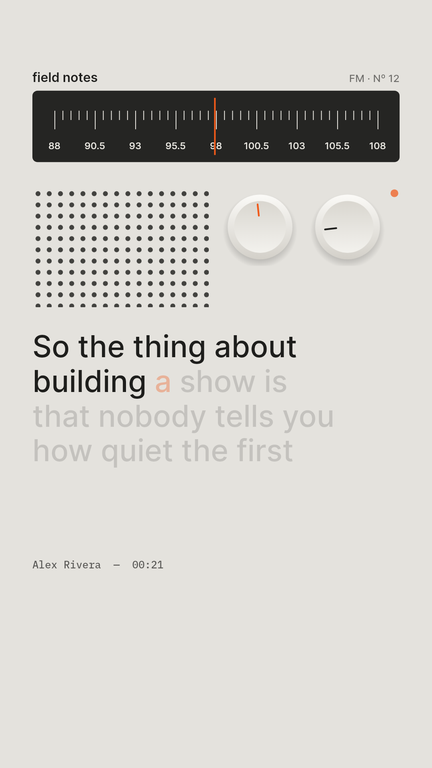
Braun radio
braun-radio · light
Dieter Rams-style radio: tuning scale with an orange needle that follows the voice, perforated grille, two knobs (voice level, elapsed time).
- Uses:
- Show name, Episode, Speaker
- When fields are empty:
- Labels are omitted; the radio itself carries the design.
- Presets that suit it (preset mode):
- Editorial, Sharp Notes, Frosted
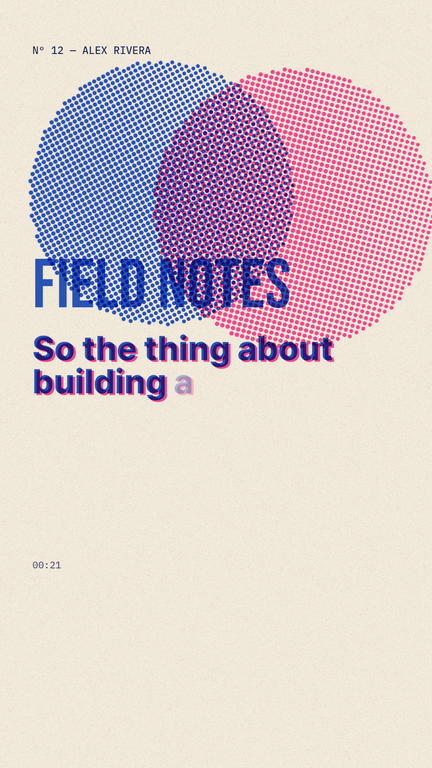
Riso print
riso · light
Two-ink risograph: halftone discs in fluoro pink and blue overprint and breathe with the voice; misregistered type on paper tooth.
- Uses:
- Show name, Episode, Speaker
- When fields are empty:
- No show name: the big title reads PODCAST.
- Presets that suit it (preset mode):
- Editorial, Sharp Notes, Frosted
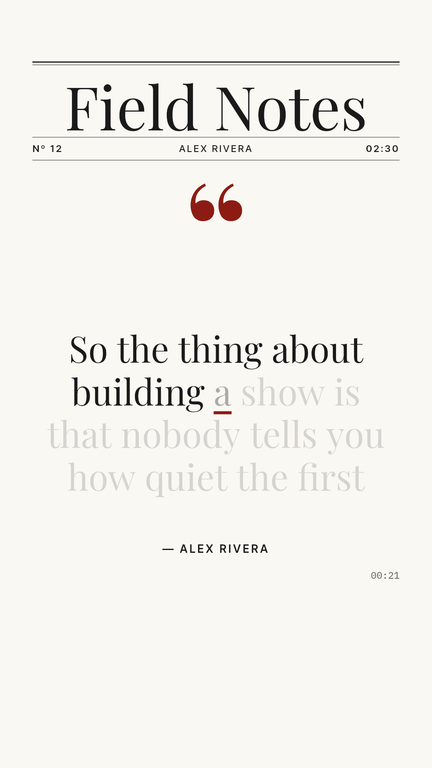
Editorial cover
editorial-cover · light
Magazine cover: serif masthead and issue line; the sentence is set as a pull-quote word by word, with a hairline under the spoken word that thickens with the voice.
- Uses:
- Show name, Episode, Speaker
- When fields are empty:
- No show name: the masthead reads Podcast. No speaker: the byline is omitted.
- Presets that suit it (preset mode):
- Editorial, Sharp Notes, Frosted
Bauhaus
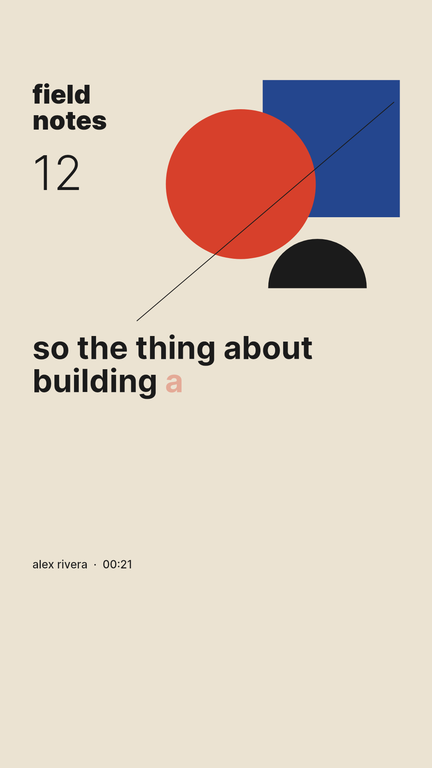
bauhaus · light
Circle, square and half-disc on a grid; each answers the voice with its own small delay. Heavy lowercase type.
- Uses:
- Show name, Episode, Speaker
- When fields are empty:
- The type stack is omitted; the composition stands alone.
- Presets that suit it (preset mode):
- Editorial, Sharp Notes, Frosted
Continuous line
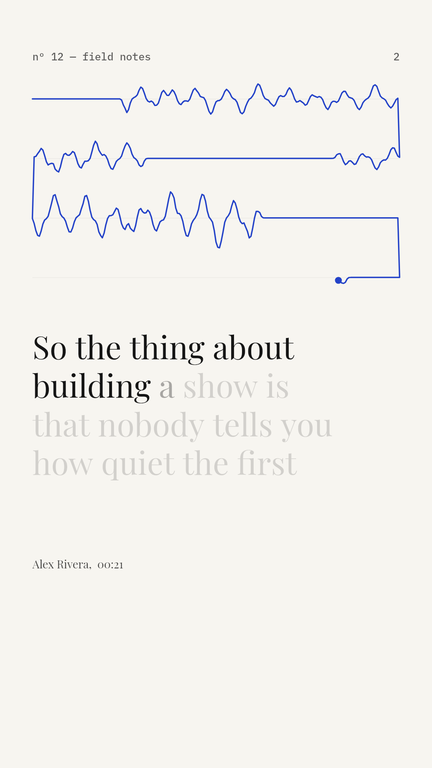
continuous-line · light
One pen line writes the voice across ruled rows, back and forth so it never lifts; a nib dot marks the tip.
- Uses:
- Show name, Episode, Speaker
- When fields are empty:
- Labels are omitted.
- Presets that suit it (preset mode):
- Editorial, Sharp Notes, Frosted
Vinyl
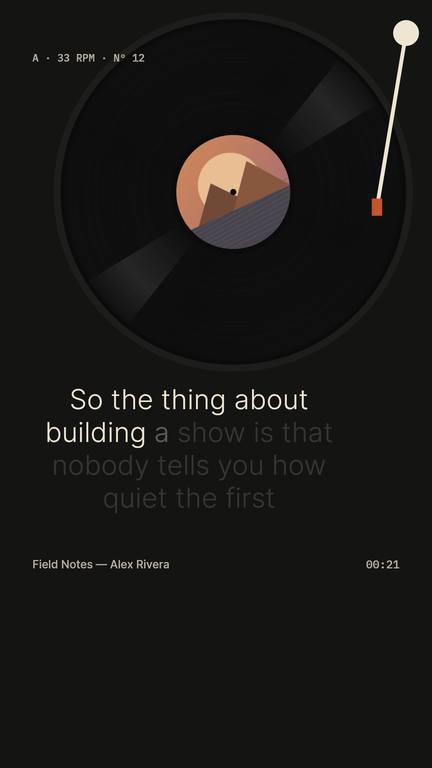
vinyl · dark
Top-down turntable: matte record turning at 33 rpm, cover art on the label, a light sheen that brightens with the voice, tonearm moving with progress.
- Uses:
- Show name, Episode, Speaker, Cover image
- When fields are empty:
- No cover: a plain label in the ink colour with the show name (or nothing).
- Presets that suit it (preset mode):
- Clarity, Iman Lowercase, Podcast Karaoke
Type as waveform
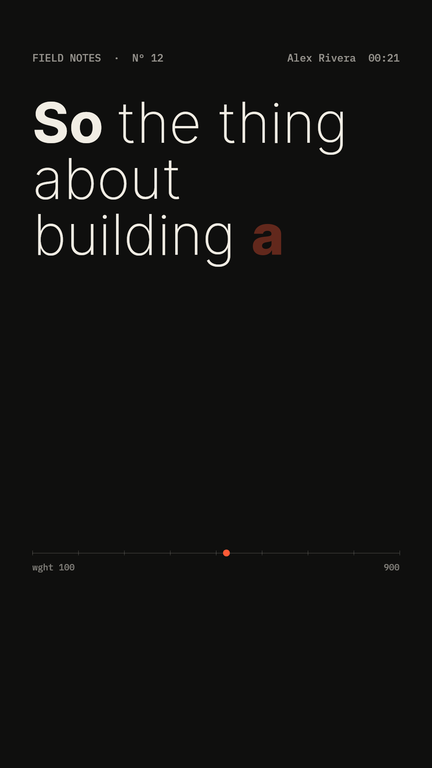
type-wave · dark
The captions are the visual: each word is set at the weight of its own loudness (Inter 200-900), with a live weight scale.
- Uses:
- Show name, Episode, Speaker
- When fields are empty:
- Labels are omitted. In preset mode the show name (or PODCAST) breathes in weight instead.
- Presets that suit it (preset mode):
- Clarity, Iman Lowercase, Podcast Karaoke
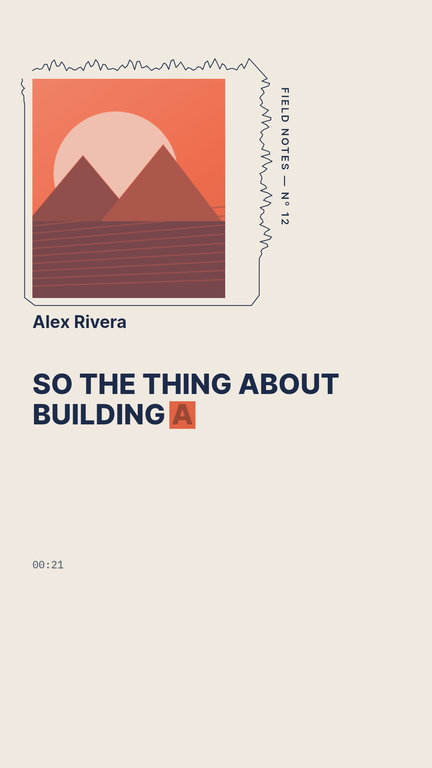
Duotone portrait
duotone-portrait · light
Cover art or host photo in two inks, framed by a hairline that carries the voice around its edge; heavy caps with a marker block on the spoken word.
- Uses:
- Show name, Episode, Speaker, Cover image
- When fields are empty:
- No cover: a two-ink gradient field with the show's initials.
- Presets that suit it (preset mode):
- Editorial, Sharp Notes, Frosted
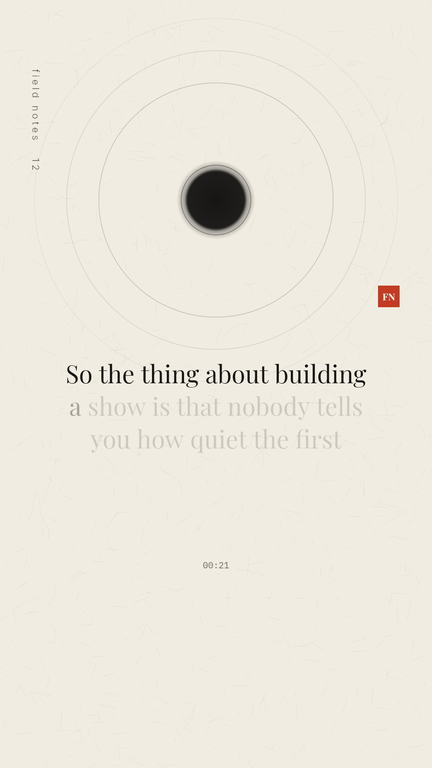
Ma
ma · light
Japanese restraint: one sumi ink dot on washi that breathes, slow rings on loud syllables, a vermilion seal and a vertical label.
- Uses:
- Show name, Episode, Speaker
- When fields are empty:
- No show name: the seal is a plain vermilion square.
- Presets that suit it (preset mode):
- Editorial, Sharp Notes, Frosted
Fields
| Field | Type | What it does |
|---|
| showName | string, max 60 | Show / podcast name. Used in mastheads, labels and seals. Empty: the element is omitted (masthead designs fall back to "Podcast"). |
| episode | string, max 12 | Episode label or number, e.g. "42" or "S2·E7". Printed after Nº. Empty: omitted (Swiss grid shows the running timecode as its numeral). |
| speaker | string, max 60 | Speaker / host name for bylines and name plates. Empty: omitted. |
| coverSrc | image | Optional cover art or host photo (PNG/JPEG/WebP, max 5 MB). Used by designs that list it in `usesCover`; ignored by the others. Empty: the design draws its own graphic. |
| background | color | Paper (ground) colour, #rgb or #rrggbb. Default: the design's own paper. Text ink is picked automatically for contrast unless `ink` is set. |
| accent | color | Accent colour (#hex): the spoken word, needles, seals, rules. Default: the design's own accent. |
| ink | color | Text/line colour (#hex). Default: the design's ink, or near-black/near-white chosen from the paper's luminance when `background` is changed. |
| captionMode | enum, default integrated | integrated: the design typesets the transcript itself (pull-quote, word by word) and the caption preset is not drawn. preset: your caption preset draws as usual and the design keeps its caption band clear. |
| contrastGuard | boolean, default true | preset mode only: when the preset's text colour has too little contrast with the paper (e.g. white text on a light design), the caption text switches to the design's ink and drops its stroke/shadow. |
In the API the cover is sent as coverImageUrl (https) or coverFileId (from POST /v1/uploads).
Tips
- Integrated mode looks best for most shows: the design typesets the words and the caption preset is not drawn.
- Light designs with preset mode: use a dark-text preset (Editorial, Sharp Notes, Frosted). If you keep a white-text preset, the contrast guard switches its text to the design ink.
- Dark designs (Vinyl, Type as waveform): Clarity, Iman Lowercase or Podcast Karaoke read well.
- Changing the paper colour re-picks the ink automatically; set ink only if you need a specific brand colour.
- Keep the show name short (under ~24 characters) so mastheads stay on one line.
API and MCP
Send audioVisual with caption_video, burn_captions or the free style_preview. GET https://api.awesomevideoeditor.com/v1/audio-visuals lists every design with its fields, defaults, recommended presets and a preview image URL. Invalid fields fail with 422 before anything is charged.
REST
curl -X POST https://api.awesomevideoeditor.com/v1/captions \
  -H "Authorization: Bearer $AWESOME_KEY" -H "Content-Type: application/json" \
  -d '{"sourceUrl":"https://example.com/episode.mp3","preset":"Editorial",
       "audioVisual":{"variant":"editorial-cover","showName":"Field Notes",
                      "episode":"12","speaker":"Alex Rivera"}}'
MCP
caption_video {
  "sourceUrl": "https://example.com/episode.mp3",
  "preset": "Clarity",
  "audioVisual": { "variant": "vinyl", "showName": "Field Notes",
                   "coverImageUrl": "https://example.com/cover.jpg" }
}
Full reference with a copy-paste body per design: llms-full.txt · OpenAPI.
Old design ids
The ten earlier visualizers were replaced. Their ids still work: each maps to the design below and the response carries a deprecation warning. Their old options (presetId, config, gradient backgrounds) are ignored. Saved projects open with the new design.
| Old id | Now |
|---|
| bars | swiss-grid |
| ribbon | continuous-line |
| rings | ma |
| spectrogram | riso |
| skyline | bauhaus |
| silkline | type-wave |
| ivory | editorial-cover |
| halo | vinyl |
| needle | braun-radio |
| mono | duotone-portrait |